• Docs
  • Changelog
Sign in
Get started
    • Home
    • Your first deploy
    • Free instances
    • Platform features by plan
    • Use with coding agents
    • FAQ
    • Templates
      • Migrate from…
        • Heroku
        • Railway
    • Compute plans
    • SandboxesBeta
      • Service types
        • Which to use?
        • Static sites
        • Web services
        • Private services
        • Background workers
        • Cron jobs
        • Workflows
        • Multi-service architectures
      • Data storage
        • Render Postgres
        • Render Key Value (Redis®-compatible)
        • Persistent disks
    • How deploys work
    • Supported languages
    • Git providers (GitHub, etc.)
    • Build pipeline
    • Deploy hooks
    • Monorepo support
    • Troubleshooting deploys
      • Previewing changes
        • Single-service previews
        • Preview environments (multi-service)
      • Docker deploys
        • Overview
        • Deploy a registered image
        • Using secrets
      • Runtime
        • Native runtimes
        • Environment variables & secrets
        • Default environment variables
    • Intro to sandboxes
    • Limits
      • How to…
        • Create & configure sandboxes
        • Execute commands
        • Manage files
        • Manage snapshots
      • Use with…
        • Claude Managed Agents
        • Cursor Cloud Agents
        • OpenAI Agents API
      • SDK/CLI reference
        • TypeScript SDK
        • Python SDK
        • CLI commands
    • Intro to workflows
    • Tutorial
    • Limits & pricing
      • How to…
        • Define tasks
        • Define flowsNew
        • Trigger runs
        • Develop locally
      • SDK reference
        • TypeScript SDK
        • Python SDK
      • Example workflows
        • TypeScript examples
        • Python examples
    • Overview
    • Create & connect
    • Database credentials
    • Extensions
    • Version upgrades
    • Logical replication
    • Legacy instance types
      • Database recovery
        • Recovery & backups
        • High availability
      • Database performance
        • Read replicas
        • Connection pooling
        • Admin apps
        • Repacking tables
        • Troubleshooting performance
    • Regions
    • Inbound IP rules
    • Edge caching
    • WebSockets
    • TLS certificates
      • Custom domains
        • Overview
        • Cloudflare
        • Namecheap
        • Other DNS providers
      • Internal traffic
        • Private network
        • Private links
      • Outbound traffic
        • Default IP ranges
        • Dedicated IP addresses
        • Outbound bandwidth
        • Handling network changes
      • Static site config
        • Custom response headers
        • Redirects & rewrites
    • The Render Dashboard
    • SSH / Shell access
    • Projects & environments
      • Service actions
        • Scaling
        • Rollbacks
        • Maintenance mode
        • One-off jobs
      • Infrastructure as code
        • Blueprints overview
        • render.yaml reference
        • Terraform provider
    • In-dashboard metrics
    • Health checks
    • Uptime best practices
      • Logging
        • In-dashboard logs
        • Log streams (syslog/HTTPS)
      • OpenTelemetry (OTel) metrics
        • Provider setup
        • Metrics reference
      • Notifications
        • Webhooks
        • Email / Slack
    • MCP Server
      • Render CLI
        • Overview
        • Command reference
      • REST API
        • Overview
        • API reference
      • Third-party connections
        • OIDC support
        • Datadog
    • Workspaces, members, & roles
    • Login settings
    • Audit logs
      • Organizations
        • Overview
        • SAML SSO
    • DDoS protection
    • Platform maintenance
      • Compliance
        • Overview
        • HIPAA (US health data)
        • HIPAA best practices
        • Shared responsibility model
        • Pentest policy
    • Heroku vs Render
    • Vercel vs Render

Connecting to MongoDB Atlas

This guide walks through connecting your Render-hosted application to a database hosted on MongoDB Atlas. This is an alternative to hosting a containerized instance of MongoDB on Render. If you prefer to host your own MongoDB instance on Render, see Deploy MongoDB.

For advanced usage and troubleshooting, see the MongoDB documentation

Create and configure a database

You complete these steps in the MongoDB Atlas web interface.

  1. Select one of the following deployment options for your database:

    • Serverless
    • Dedicated
    • Shared
  2. Select AWS as the cloud provider and pick the AWS region closest to the region where your Render app is deployed. You can also set the cluster tier, cluster name, and any additional settings at this point. Click Create Cluster.

    Render RegionDatabase Region
    Oregon, USAOregon (us-west-2)
    Ohio, USADedicated tier: Ohio (us-east-2)
    Shared tier: N. Virginia (us-east-1)
    Virginia, USAVirginia (us-east-1)
    Frankfurt, GermanyFrankfurt (eu-central-1)
    SingaporeSingapore (ap-southeast-1)
  3. Choose an authentication method. This guide assumes you are using a username and password for authentication. You could also use a Certificate.

  4. Create a user profile for the new database and make a note of your database username and password. You will create environment variables for these values in your Render service connecting to Atlas.

  5. Update cluster connections under "Network Access". Add your Render service's outbound IP addresses.
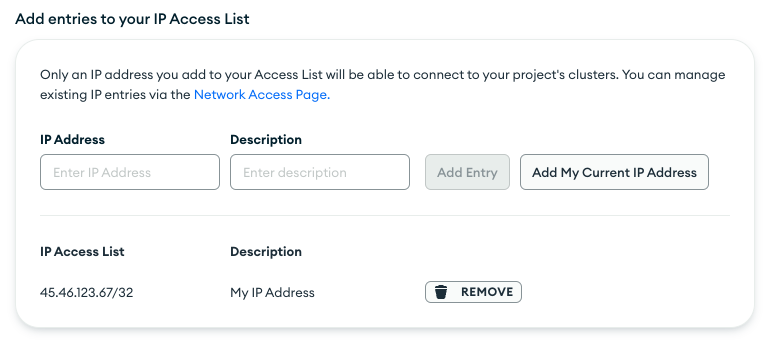
    MongoDB Atlas IP

  6. Under "Connection Method", select "Connect your Application". Pick the Mongo driver and version used in your Render service to create a connection string URI.

Connect to your application on Render

  1. Return to the Render Dashboard and create environment variables for username and password in your Render service using the database username and password your created above.

    • There are some characters that require special treatment. See the MongoDB documentation on connection string formats
  2. Add connection details to your code by following the steps for your app's language or framework.

That's it! Your Render service should now be able to connect to your MongoDB Atlas instance.

Further reading

MongoDB supports a variety of drivers. This guide highlights some of the most useful resources for Python and Node applications.

Python

The method for adding a database connection to your Python application code depends on whether your application is synchronous or asynchronous.

Use PyMongo in your application to connect to MongoDB (for synchronous applications)

  • Tutorial for completing common database operations with PyMongo

Use Motor in your Python app to connect to MongoDB Atlas (for asynchronous applications using either Tornado or asyncio.

  • Tutorial for completing common database operations using Motor with Tornado
  • Tutorial for completing common database operations using Motor with asyncio

Node

  • Guide to CRUD operations for Interacting with the Database in Node Applications
Connecting to MongoDB Atlas
  • Create and configure a database
  • Connect to your application on Render
  • Further reading
    • Python
    • Node
All Systems Operational
© Render Inc. All rights reserved.