Workspaces, Members, and Roles
Create your workspace, add collaborators, and manage access.
Everything you create on Render (services, datastores, and so on) belongs to a workspace. Every workspace has an associated plan that determines available features and how many team members you can invite.
When you sign up for Render, we automatically create your first workspace on the free Hobby plan. You can create additional workspaces or change a workspace's plan at any time.
With a Scale or Enterprise plan, you can manage multiple workspaces and team members in a unified organization.
Create a workspace
You can have up to five Hobby workspaces.
You can create an unlimited number of paid workspaces.
-
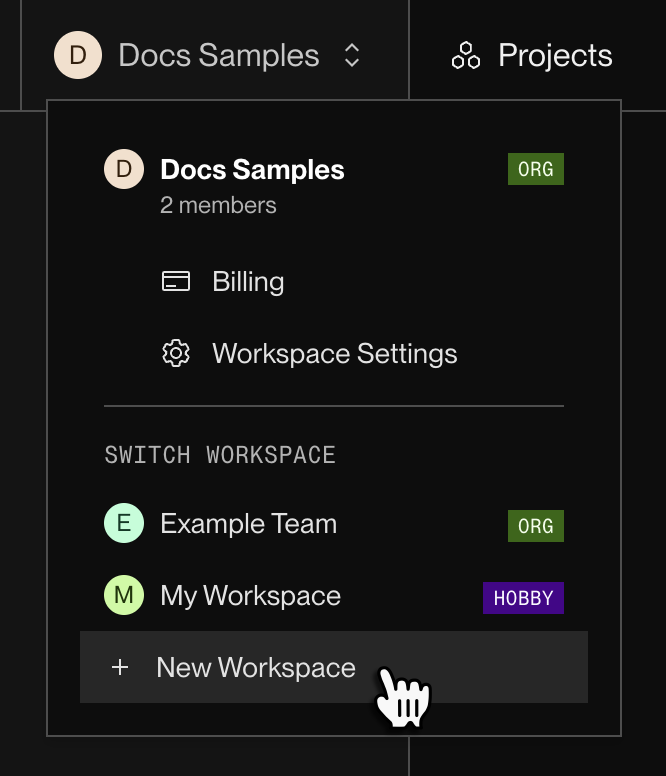
In the Render Dashboard, open the workspace dropdown at the top of the left pane, then click + New Workspace:
-
Complete the workspace creation flow, including specifying a plan type and payment method. Then click Create Workspace.

You're all set! Render creates your workspace and assigns you the Admin role. You can switch between your different workspaces from the same dropdown.
Now you can start creating services and other resources in your workspace. With a Pro workspace or higher, you can also invite team members.
Change a workspace's plan
You can change your workspace's plan in the Render Dashboard:
- Open the workspace dropdown in the top-left corner and select Billing.
- Under the Plan section, click Update Plan.
- Click the Choose button for your desired plan.
- To switch to an Enterprise plan, instead please contact sales.
- Review the details of your plan change, including any reduction in available features if you're downgrading.
- Click Confirm.
Your plan change takes effect immediately. You can view your workspace's current plan from the Billing page at any time.
Manage team members
You can't add team members to a Hobby workspace.
First, upgrade your workspace to Pro or higher.
Team members with the Admin role can manage other team members (including other admins):
-
From your workspace's home in the Render Dashboard, click Settings in the left pane.
-
Scroll down to the Team members section.
Member roles
Each member of a workspace has one of the following roles:
| Role | Available on | Description |
|---|---|---|
|
Admin | All plans |
|
|
Developer | All plans |
|
|
Contributor |
Scale or higher |
Similar to the Developer role, with the following additional restrictions:
|
|
Viewer |
Scale or higher |
|
|
Billing |
Scale or higher |
|
Admins can reassign member roles from the Workspace Settings page in the Render Dashboard.
On a Scale or Enterprise plan with multiple workspaces, org members can have a different role in each workspace.
Role permissions
🟢 Permitted
❌ Not permitted
🟨 Permitted with restrictions (details vary by permission)
Workspace administration
| Permission | Admin | Developer | Contributor | Viewer | Billing |
|---|---|---|---|---|---|
|
View workspace members | 🟢 | 🟢 | 🟢 | 🟢 | 🟢 |
|
Edit workspace settings | 🟢 | ❌ | ❌ | ❌ |
🟨
Billing settings only. |
|
Add/remove workspace members | 🟢 | ❌ | ❌ | ❌ | ❌ |
|
Export audit logs | 🟢 | ❌ | ❌ | ❌ | ❌ |
|
View billing details | 🟢 | 🟢 | ❌ | ❌ | 🟢 |
|
Edit payment method | 🟢 | ❌ | ❌ | ❌ | 🟢 |
|
Leave workspace | 🟢 | 🟢 | 🟢 | 🟢 | 🟢 |
|
Delete workspace | 🟢 | ❌ | ❌ | ❌ | ❌ |
Projects and environments
| Permission | Admin | Developer | Contributor | Viewer | Billing |
|---|---|---|---|---|---|
|
View projects | 🟢 | 🟢 | 🟢 | 🟢 | 🟢 |
|
Create/modify projects | 🟢 | 🟢 | ❌ | ❌ | ❌ |
|
Delete projects | 🟢 |
🟨
Can't delete a project with at least one protected environment. | ❌ | ❌ | ❌ |
|
View environments | 🟢 | 🟢 | 🟢 | 🟢 | 🟢 |
|
Create environments | 🟢 | 🟢 | ❌ | ❌ | ❌ |
|
Modify/delete environments | 🟢 |
🟨
Non-protected environments only. | ❌ | ❌ | ❌ |
|
Designate an environment as protected or network-isolated | 🟢 | ❌ | ❌ | ❌ | ❌ |
|
Move resources into or out of an environment | 🟢 |
🟨
Non-protected environments only. | ❌ | ❌ | ❌ |
|
Manage environment secrets | 🟢 |
🟨
Non-protected environments only. | ❌ | ❌ | ❌ |
Services and datastores
| Permission | Admin | Developer | Contributor | Viewer | Billing |
|---|---|---|---|---|---|
|
View services | 🟢 | 🟢 | 🟢 | 🟢 | 🟢 |
|
Create services | 🟢 |
🟨
Non-protected environments only. | ❌ | ❌ | ❌ |
|
Modify service configuration | 🟢 |
🟨
Can't perform potentially destructive modifications to services in a protected environment. | ❌ | ❌ | ❌ |
|
Trigger service deploys | 🟢 | 🟢 | 🟢 | ❌ | ❌ |
|
Trigger rollbacks | 🟢 | 🟢 | 🟢 | ❌ | ❌ |
|
Delete services | 🟢 |
🟨
Non-protected environments only. | ❌ | ❌ | ❌ |
|
View connection strings and credentials for datastores | 🟢 |
🟨
Non-protected environments only. | ❌ | ❌ | ❌ |
|
Manage inbound IP rules | 🟢 |
🟨
Varies by resource type. See details. | ❌ | ❌ | ❌ |
|
Access running services via SSH or the Shell tab | 🟢 |
🟨
Non-protected environments only. | ❌ | ❌ | ❌ |
Observability
| Permission | Admin | Developer | Contributor | Viewer | Billing |
|---|---|---|---|---|---|
|
View service events | 🟢 | 🟢 | 🟢 | 🟢 | ❌ |
|
View service metrics | 🟢 | 🟢 | 🟢 | 🟢 | ❌ |
|
View service logs | 🟢 | 🟢 | 🟢 | ❌ | ❌ |
Integrations
| Permission | Admin | Developer | Contributor | Viewer | Billing |
|---|---|---|---|---|---|
|
Configure notification settings | 🟢 | ❌ | ❌ | ❌ | ❌ |
|
Create and configure webhooks | 🟢 | ❌ | ❌ | ❌ | ❌ |