• Docs
  • Changelog
Sign in
Get started
    • Home
    • Your first deploy
    • Free instances
    • Platform features by plan
    • Use with coding agents
    • FAQ
    • Templates
      • Migrate from…
        • Heroku
        • Railway
    • Compute plans
    • SandboxesBeta
      • Service types
        • Which to use?
        • Static sites
        • Web services
        • Private services
        • Background workers
        • Cron jobs
        • Workflows
        • Multi-service architectures
      • Data storage
        • Render Postgres
        • Render Key Value (Redis®-compatible)
        • Persistent disks
    • How deploys work
    • Supported languages
    • Git providers (GitHub, etc.)
    • Build pipeline
    • Deploy hooks
    • Monorepo support
    • Troubleshooting deploys
      • Previewing changes
        • Single-service previews
        • Preview environments (multi-service)
      • Docker deploys
        • Overview
        • Deploy a registered image
        • Using secrets
      • Runtime
        • Native runtimes
        • Environment variables & secrets
        • Default environment variables
    • Intro to sandboxes
    • Limits
      • How to…
        • Create & configure sandboxes
        • Execute commands
        • Manage files
        • Manage snapshots
      • Use with…
        • Claude Managed Agents
        • Cursor Cloud Agents
        • OpenAI Agents API
      • SDK/CLI reference
        • TypeScript SDK
        • Python SDK
        • CLI commands
    • Intro to workflows
    • Tutorial
    • Limits & pricing
      • How to…
        • Define tasks
        • Define flowsNew
        • Trigger runs
        • Develop locally
      • SDK reference
        • TypeScript SDK
        • Python SDK
      • Example workflows
        • TypeScript examples
        • Python examples
    • Overview
    • Create & connect
    • Database credentials
    • Extensions
    • Version upgrades
    • Logical replication
    • Legacy instance types
      • Database recovery
        • Recovery & backups
        • High availability
      • Database performance
        • Read replicas
        • Connection pooling
        • Admin apps
        • Repacking tables
        • Troubleshooting performance
    • Regions
    • Inbound IP rules
    • Edge caching
    • WebSockets
    • TLS certificates
      • Custom domains
        • Overview
        • Cloudflare
        • Namecheap
        • Other DNS providers
      • Internal traffic
        • Private network
        • Private links
      • Outbound traffic
        • Default IP ranges
        • Dedicated IP addresses
        • Outbound bandwidth
        • Handling network changes
      • Static site config
        • Custom response headers
        • Redirects & rewrites
    • The Render Dashboard
    • SSH / Shell access
    • Projects & environments
      • Service actions
        • Scaling
        • Rollbacks
        • Maintenance mode
        • One-off jobs
      • Infrastructure as code
        • Blueprints overview
        • render.yaml reference
        • Terraform provider
    • In-dashboard metrics
    • Health checks
    • Uptime best practices
      • Logging
        • In-dashboard logs
        • Log streams (syslog/HTTPS)
      • OpenTelemetry (OTel) metrics
        • Provider setup
        • Metrics reference
      • Notifications
        • Webhooks
        • Email / Slack
    • MCP Server
      • Render CLI
        • Overview
        • Command reference
      • REST API
        • Overview
        • API reference
      • Third-party connections
        • OIDC support
        • Datadog
    • Workspaces, members, & roles
    • Login settings
    • Audit logs
      • Organizations
        • Overview
        • SAML SSO
    • DDoS protection
    • Platform maintenance
      • Compliance
        • Overview
        • HIPAA (US health data)
        • HIPAA best practices
        • Shared responsibility model
        • Pentest policy
    • Heroku vs Render
    • Vercel vs Render

Maintenance Mode

Temporarily disable public traffic to your web service.

To help you make major infrastructure changes safely, you can enable maintenance mode for any paid web service:

The default maintenance page for a service in maintenance mode

A web service in maintenance mode remains up and running, but it's unreachable from the public internet. This helps you ensure that no user actions are in progress while you make changes.

A web service in maintenance mode is still reachable over your private network and via SSH.

Steps to enable

Maintenance mode is available only for paid web services.

  1. From your web service's Settings page in the Render Dashboard, scroll down to the Maintenance Mode section:
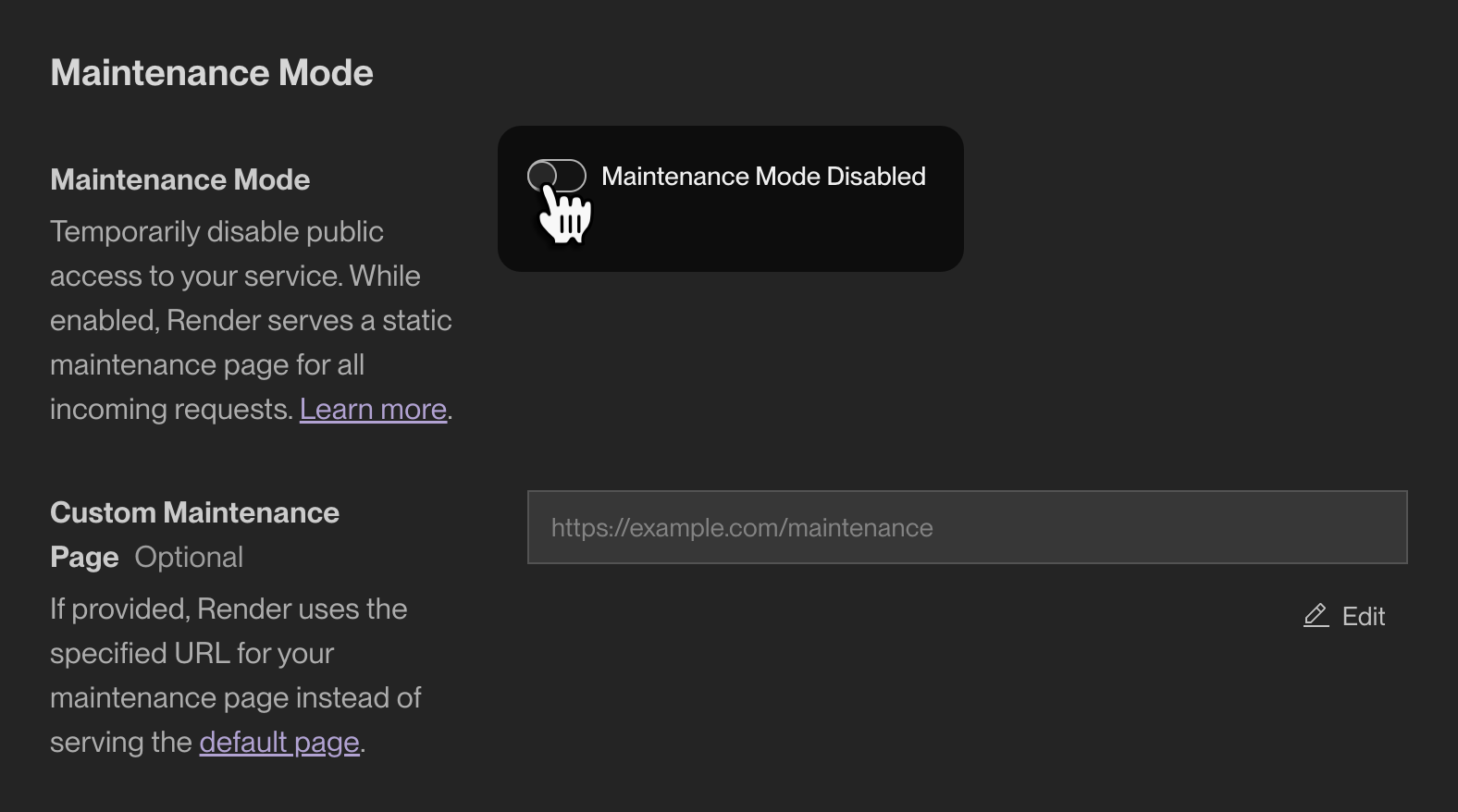
    Enabling maintenance mode in the Render Dashboard

  2. Toggle the switch and confirm your action in the dialog that appears.

That's it! After you confirm, Render immediately enables maintenance mode for the service. You can disable it at any time by toggling the switch back.

Add the maintenanceMode field to your service's configuration in your Blueprint YAML file:

To use a custom maintenance page, you can optionally set uri:

If you omit uri, Render displays the default maintenance page.

Response format

While your web service is in maintenance mode, Render responds to every incoming request with a 503 Service Unavailable status code and your specified maintenance page:

  • By default, Render displays this maintenance page.
  • Set a custom maintenance page by specifying its URL in your service's maintenance mode settings.
    • This must not be a URL of the service in maintenance mode. We recommend providing the URL of a page on a static site.
    • If your custom URL returns an error, Render responds with that error (not the default maintenance page).
Maintenance Mode
  • Steps to enable
  • Response format
All Systems Operational
© Render Inc. All rights reserved.